Traces
Replay every session step by step — events, messages, tool calls, artifacts, and plans, with kind-aware highlighting and honest reasoning labels.
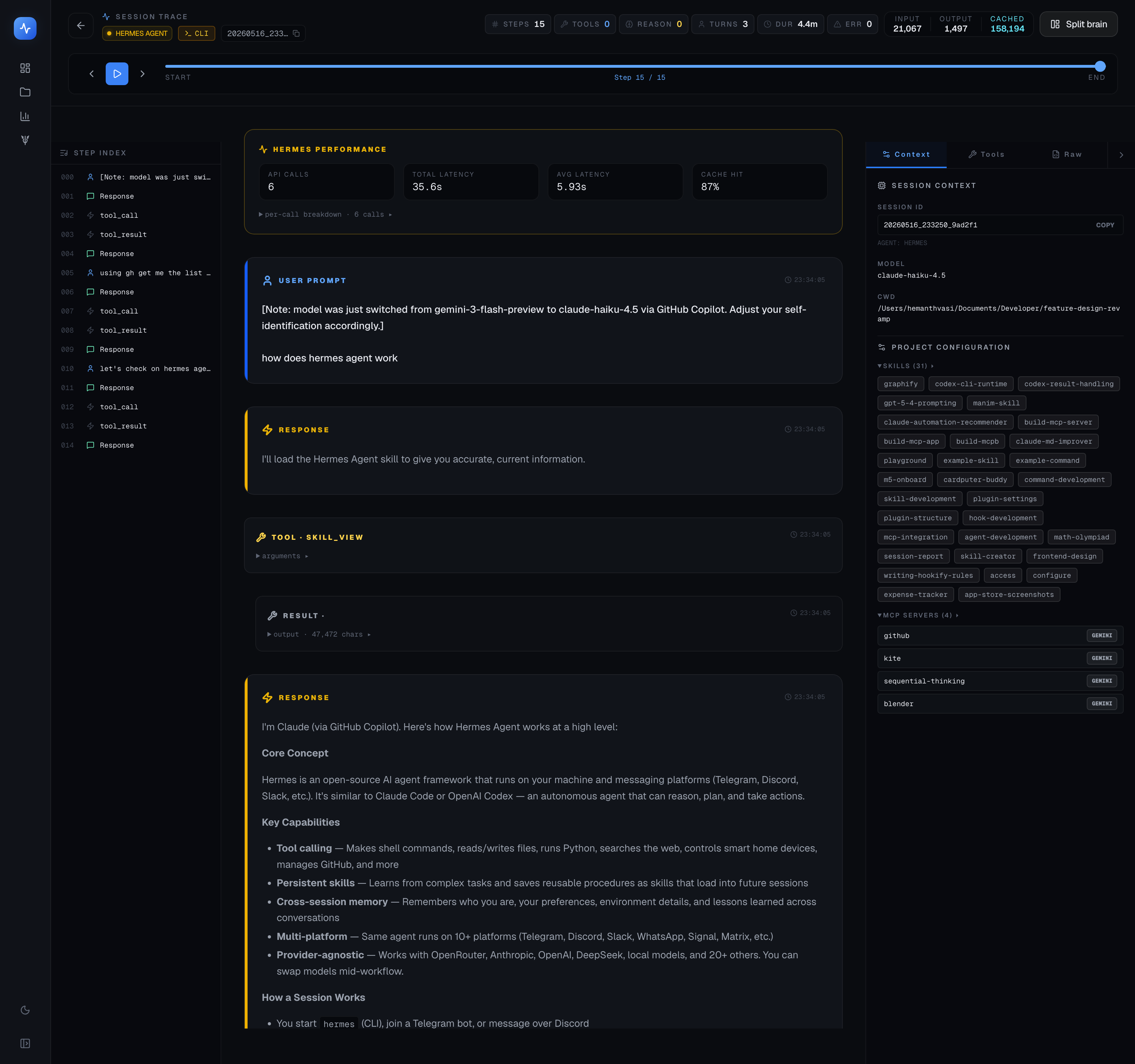
A trace is a replayable record of a single agent session. Open any session from the Dashboard's recent activity feed, from the Analytics table, or from Projects → Activity to see its full trace.
Video walkthrough
Token and cost header
At the top of every trace is a summary header showing:
- Input tokens — tokens the agent sent to the model
- Output tokens — tokens the model returned
- Cache tokens — input tokens served from the model's prompt cache (where available)
- Cost — the API-equivalent cost for this session
- Model — the model that handled the session
- Duration — wall-clock time from session start to end
These numbers come directly from the session log — no estimation.
Five tabs
Events
A timeline of every event in the session in chronological order: the session start, each assistant turn, each tool call and its result, and the session end. Events are color-coded by kind:
- Amber — reasoning / thinking blocks
- Sky blue — tool calls and results
- Emerald — assistant responses
- Default — user turns and system events
Use the Events tab to get an at-a-glance feel for the session structure: how many tool calls, how much reasoning, how much direct output.
Messages
The Messages tab shows the full conversation: user messages, system prompts, and assistant responses in order. This is the raw conversation as the model saw it.
Tools
A focused view of every tool call, grouped by tool name. Each entry shows:
- The tool name (e.g.
Bash,Edit,Read,WebSearch) - The arguments passed
- The result returned
- Timing (time from session start, and duration of the tool call)
- Success or failure
The Tools tab is useful when you want to audit what your agent actually ran — especially for Bash commands, where seeing the exact command and its output is more useful than reading the conversation.
Artifacts
The Artifacts tab shows any files the agent created or captured during the session:
- Screenshots (from Antigravity or browser automation)
- Browser recording thumbnail strips
- Documents:
task.md,plan.md,walkthrough.md, and similar
See Artifacts for more detail on what's captured.
Plans
The Plans tab shows any plan-mode output captured during this session. For Claude Code, this includes the structured plan the agent produced after a /plan command. Plans are shown as formatted text with their timestamp.
Step navigation
The Events tab has a step navigator — forward/back arrows — so you can walk through the session event by event, as if scrubbing through a recording.
Kind-aware highlighting
Each event type has a distinct visual style so the trace is scannable at a glance:
| Kind | Color | Meaning |
|---|---|---|
| Reasoning | Amber | The model's internal thinking |
| Tool call | Sky blue | An action the agent took |
| Tool result | Sky blue (lighter) | What the tool returned |
| Response | Emerald | The model's output to the user |
| User | Default | What you (or the harness) sent |
Honest labelling of encrypted reasoning
Claude's extended thinking feature can produce encrypted reasoning blocks — thinking tokens that Anthropic encrypts before including in the session log. TokenTelemetry labels these blocks honestly: "Extended thinking (encrypted — content not available)." It never fabricates or infers reasoning content.
Parent session link
For sub-agent sessions spawned by a parent (e.g. via Claude Code's Task tool), a parent session link appears in the header. Clicking it opens the parent trace, so you can see the full delegation chain — from the top-level session down through every sub-agent it spawned.
Tips
- The Tools tab is the fastest way to see if an agent ran a command you didn't expect — especially useful after a long autonomous session.
- If reasoning blocks look empty, the session used encrypted extended thinking. This is intentional — see the "Honest labelling" note above.
- Use the parent-session link to trace a cost spike back to the root cause: find the expensive sub-agent session, then follow the link up to the parent that spawned it.