Analytics
Token trends by agent, model, and day — with date-range filters, cache efficiency metrics, and delegation graphs.
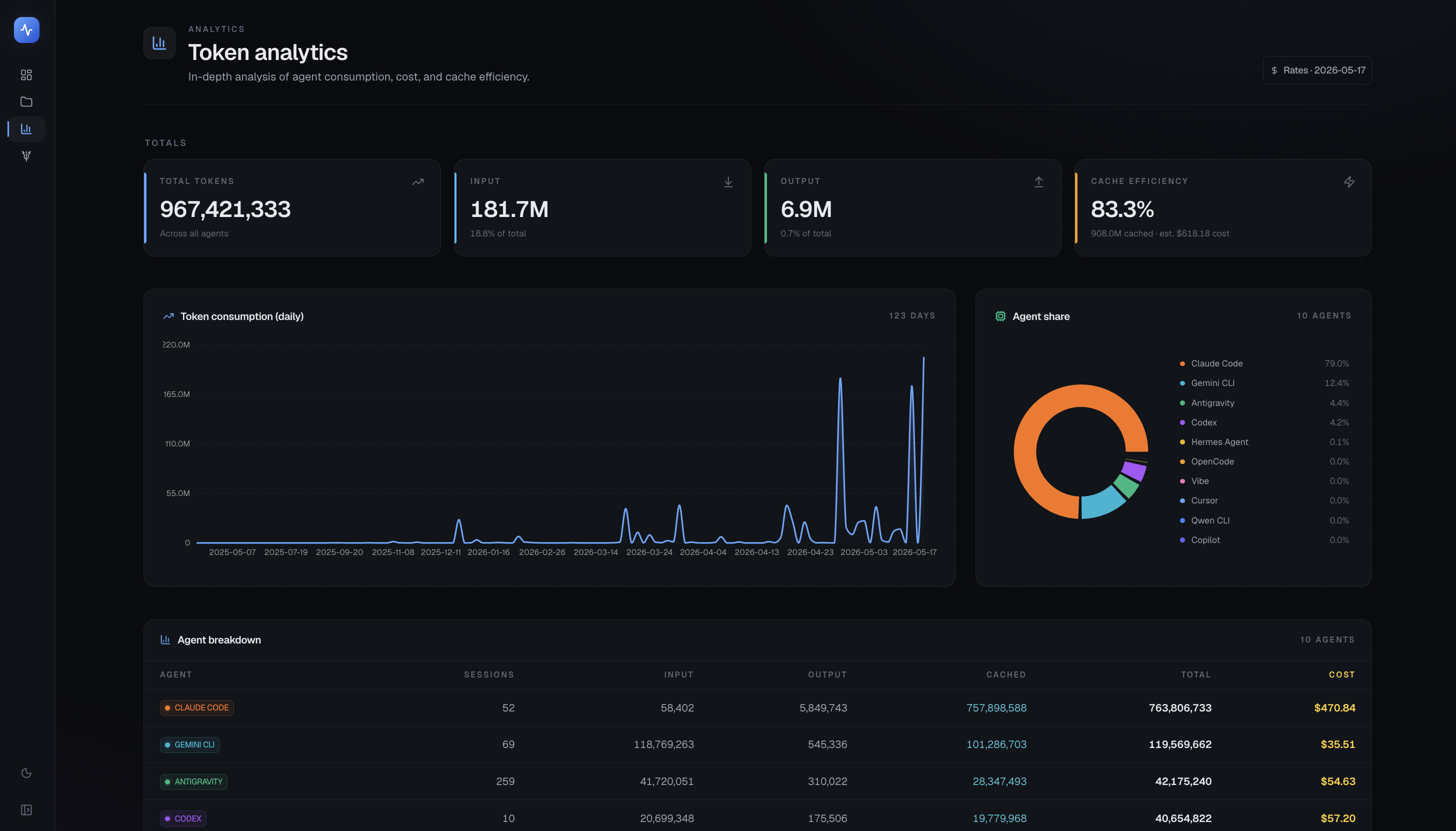
The Analytics page lets you explore token and cost trends over time, filtered by agent, model, and date range. All computation runs locally — no data ever leaves your machine.
Video walkthrough
Date presets and custom range
A date picker at the top of the page offers quick presets:
- Last 7 days
- Last 30 days
- Last 90 days
- Custom range (start date / end date)
The selected range applies to all charts and tables on the page.
Granularity
Toggle between day, week, and month granularity. Finer granularity is useful when you want to see which specific day had an expensive session; coarser granularity smooths out noise for monthly budget reviews.
Agent and model filters
Multi-select dropdowns let you narrow the view to specific agents (Claude Code, Codex, etc.) or specific models (claude-sonnet-4-6, gemini-2.0-flash, etc.). Deselecting all resets to "all agents" or "all models".
Token area chart
A stacked area chart shows daily token totals broken down by agent (or by model, depending on your grouping selection). The chart makes it easy to see:
- Which days had unusually high token spend
- Which agent is driving the most usage
- Whether usage is trending up or down
Cache efficiency
Below the main chart, a cache-efficiency panel shows:
- Cache hit rate — percentage of input tokens served from the model's prompt cache
- Cached tokens — total tokens served from cache (saving cost and latency)
- Cache savings — estimated dollar savings from cache hits
Cache data is only available for agents whose session logs include cache token counts (currently Claude Code and Codex).
Per-agent table
A sortable table shows each agent's totals for the selected period:
| Column | Description |
|---|---|
| Agent | Agent name |
| Sessions | Number of sessions |
| Input tokens | Total input tokens |
| Output tokens | Total output tokens |
| Cache hits | Tokens served from cache |
| Cost | API-equivalent cost |
Click a column header to sort. Click an agent row to filter the rest of the page to that agent.
Per-model table
A similar table groups the same data by model rather than agent. Useful for comparing models you use across multiple agents (e.g. the same claude-sonnet-4-6 invoked by both Claude Code and Codex).
Delegation & Ecosystem
The Delegation & Ecosystem section is unique to Analytics and shows how your agent usage extends beyond direct interactions:
- Subagent spend — tokens consumed by sub-agents spawned by a parent session (e.g. Claude Code's
Tasktool spawning child sessions). Shown as a share of total spend. - Delegation ranking — which parent sessions delegated the most work, ranked by delegated token count.
- Skills used — a ranked list of Claude Code skills (and equivalent for other agents) invoked during the period, with call counts.
- MCP servers — which MCP servers were active during the period and how many tool calls each received.
Data availability notice
Analytics data depends on durable history being enabled. If you recently installed TokenTelemetry or recently enabled the Durable history option in History & Retention, data for earlier dates won't be available — only sessions captured after durable history was turned on appear in the charts.
Tips
- Use the model grouping when evaluating whether to switch models — it shows you directly whether claude-sonnet-4-6 is cheaper per task than gemini-2.0-flash for your workload.
- The cache-efficiency panel is most useful when you notice costs are higher than expected — a low cache-hit rate on Claude Code often means prompt cache isn't warming up (e.g. system prompt changing between sessions).
- Delegation spend being high isn't necessarily bad — it means your parent agent is successfully farming out subtasks, which is often more efficient.