Projects
Per-working-directory cards with activity heatmaps, tool usage, configuration overlays, and a plans library.
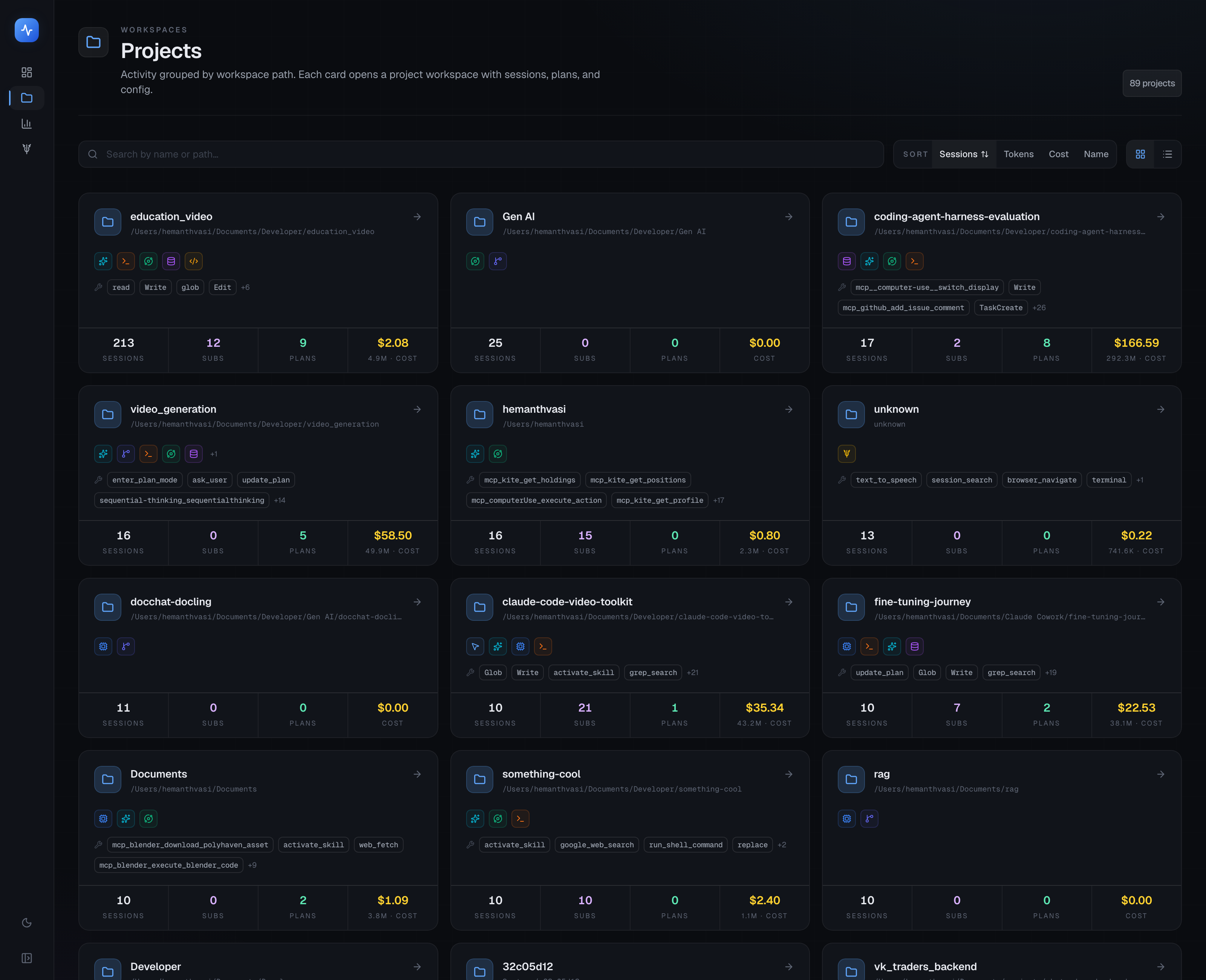
The Projects page shows one card per working directory where you've run AI agent sessions. It's the fastest way to understand how much AI activity is happening in each codebase.
Video walkthrough
Project cards
Each card shows:
- Project name (derived from the directory name, or an alias you've set)
- Directory path
- Total sessions, tokens, and cost
- A mini activity sparkline
- Which agents have been active in this project
Aliases let you collapse renamed or moved directories into a single card. Set them in ~/.tokentelemetry/aliases.json or via the Settings page.
Search, sort, and view
- Search — filter cards by project name or path. Results update as you type.
- Sort — sort by most recent activity, highest token usage, or alphabetically.
- Grid / list — toggle between a card grid and a compact list view.
Project sub-pages
Clicking a project card opens a four-tab detail view:
Activity
A chronological list of every session run in this project, with agent, model, token count, cost, and timestamp. Click any session to open its trace.
Insights
The Insights tab shows long-term patterns for this project:
- 365-day heatmap — a GitHub-style contribution heatmap of session activity over the past year. Lighter cells = fewer sessions; darker cells = more. Hover a cell to see the exact date and count.
- Streaks — longest streak of consecutive days with at least one session, and your current active streak.
- Tool usage — a ranked list of the tools your agents called most in this project (e.g.
Bash,Edit,Read,WebSearch), with call counts and success rates. - Agent leaderboard — which agents ran the most sessions in this project.
Configuration
The Configuration tab shows the AI tooling installed and configured in this project directory:
- Skills — Claude Code skills (
~/.claude/skills/) with a marker for any that are installed but have never been invoked in this project. - MCP servers — MCP servers configured for this project, with a similar "never used" overlay.
- Memory — CLAUDE.md / memory files that agents read for this project.
- Commands — slash commands defined for this project.
- Subagents — sub-agent definitions referenced from this project's configuration.
- Plugins — any installed plugins (e.g. Claude Code plugins).
The "installed but never used" overlay is a useful signal that you've set up a tool you never reach for in practice — a candidate for cleanup.
Plans
The Plans tab shows every plan-mode output captured for this project. Plans are extracted from Claude Code's /plan command (and equivalent in other agents) and stored as structured text.
Each plan entry shows:
- The date and agent session it came from
- The full plan text
- A link to the parent trace
Use this tab to review what your agent proposed before starting a task, and compare the plan against what actually happened in the trace.
Tips
- If a project shows up with its full path rather than a short name, add an alias in Settings → Projects.
- The "never used" overlay on the Configuration tab catches skill or MCP bloat — you don't pay at runtime for unused tools, but a leaner config means less noise in the agent's context window.
- The Insights heatmap respects the durable history setting. Sessions from before durable history was enabled won't appear on the heatmap.