Hermes Agent
Dedicated autonomous-agent observability for Nous Research's Hermes Agent — gateway health, 38 source platforms, skills, memory, and more.
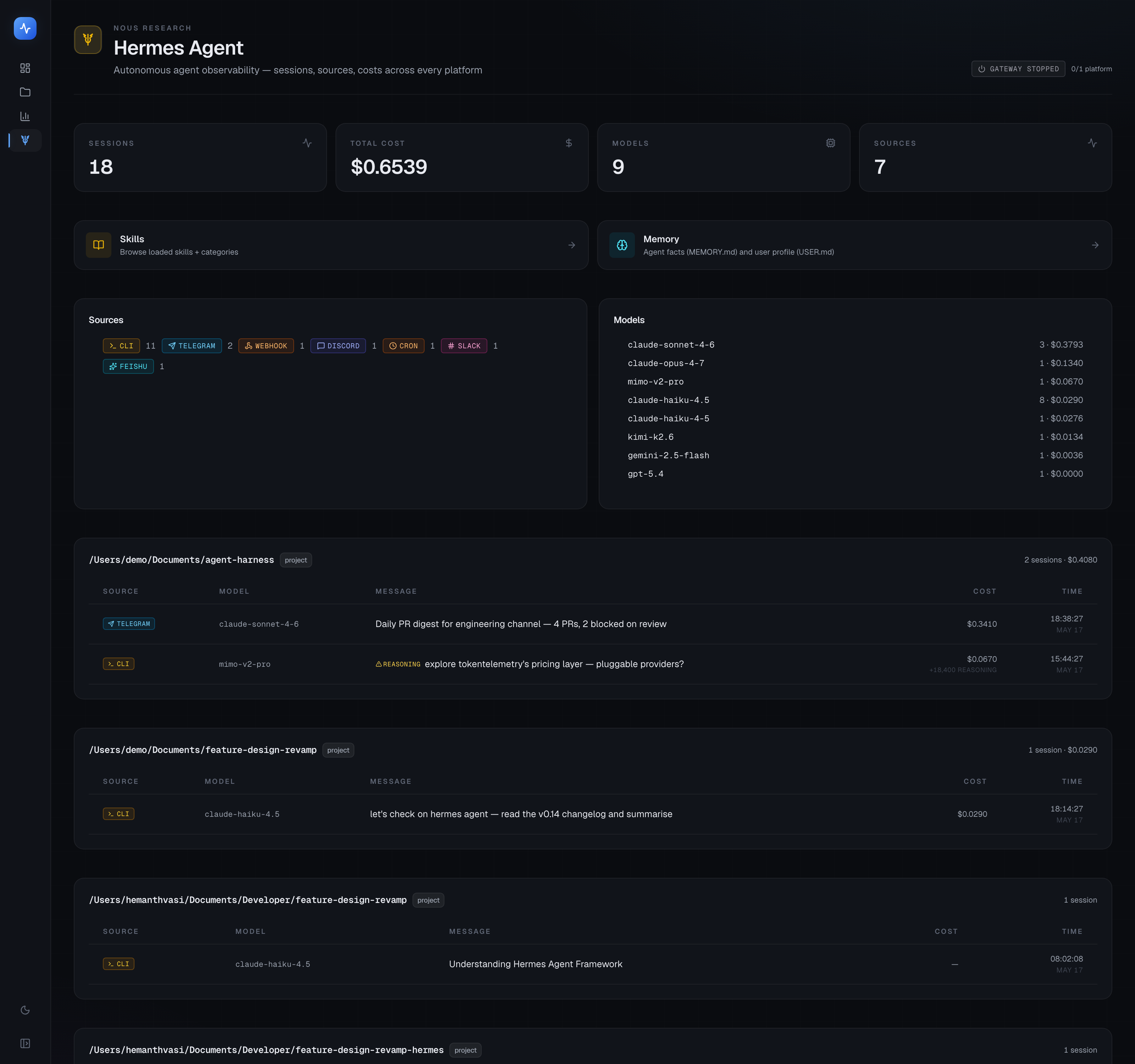
Hermes Agent (by Nous Research) isn't a coding agent — it's an autonomous agent framework that runs across CLI, messaging platforms (Telegram, Discord, Slack, Feishu, DingTalk, …), scheduled jobs, and webhooks. Because it operates differently from coding agents, it gets its own dedicated surface in TokenTelemetry at /hermes.
Coming soon
Full Hermes Agent documentation is coming soon. When published, this page will cover the complete /hermes dashboard and all seven sub-pages:
Overview:
- Gateway health status and uptime
- Source breakdown across 38 platforms (CLI / Telegram / Discord / Slack / Feishu / DingTalk / cron / webhook / …)
- Per-API-call latency and cache-hit percentages, parsed from
agent.log - Cost anomaly detection (including silent reasoning-token waste from MiMo thinking mode)
- Inline
delegate_tasksubagent cards showing each child session's summary, tokens, duration, and tool trace
Seven sub-pages:
- Skills — 90 loaded skills with platform conditions and invocation counts
- Tools — tool registry with call counts and success rates
- Profiles — active agent profiles and their configuration
- Soul — the agent's soul/persona configuration
- Memory —
MEMORY.md/USER.mdwith character-limit progress bars and edit history - Gateway — gateway connection health, latency trends, and error rates by provider
- Schedules — cron job registry, last-run status, next-run countdown, and run history
Hermes Dashboard plugin: The Hermes Dashboard plugin adds a TokenTelemetry tab inside Hermes's own web UI (port 9119), so you can deep-link to any TT page — Analytics, Projects, Traces, and the full Hermes surface — without switching browser tabs.
Install it with:
hermes plugins install VasiHemanth/tokentelemetry-hermes-plugin
hermes dashboard
Running TokenTelemetry alongside Hermes
TokenTelemetry reads Hermes's local files (~/.hermes/ by default, or $HERMES_HOME if set). Run TokenTelemetry on the same host as Hermes — remote-DB mode is not supported yet.
For Hermes running on a VPS, see Remote Access for the two supported patterns (direct --host with token, or SSH tunnel with dual-port forward).
Quick start
# Install the Hermes Dashboard plugin (optional but recommended)
hermes plugins install VasiHemanth/tokentelemetry-hermes-plugin

# Start TokenTelemetry on the same host as Hermes (from inside the cloned folder)
cd tokentelemetry && ./start.sh

# Open the Hermes surface
open http://localhost:3000/hermes