Plan Limits
Live session, weekly and monthly quota windows read from the coding-agent logins already on your machine — Claude Code, Codex, Copilot, OpenCode and Grok.
Plan limits show how much of each coding agent's plan you have actually spent: the 5-hour session window, the weekly window, credits, and when each one resets. The numbers come from the provider, not from TokenTelemetry's own accounting, so they match what you see in Claude's or Codex's own usage screen.
Where to find them
The plan-limit gauge sits at the bottom of the sidebar, above the notification bell, on every page. It is tinted by whichever window across all your agents is closest to its ceiling, so you can tell at a glance whether anything is nearly spent without opening a thing.
Hover it for the full breakdown: every window for every signed-in agent, with reset times. Click to pin the panel open so you can read or scroll it.
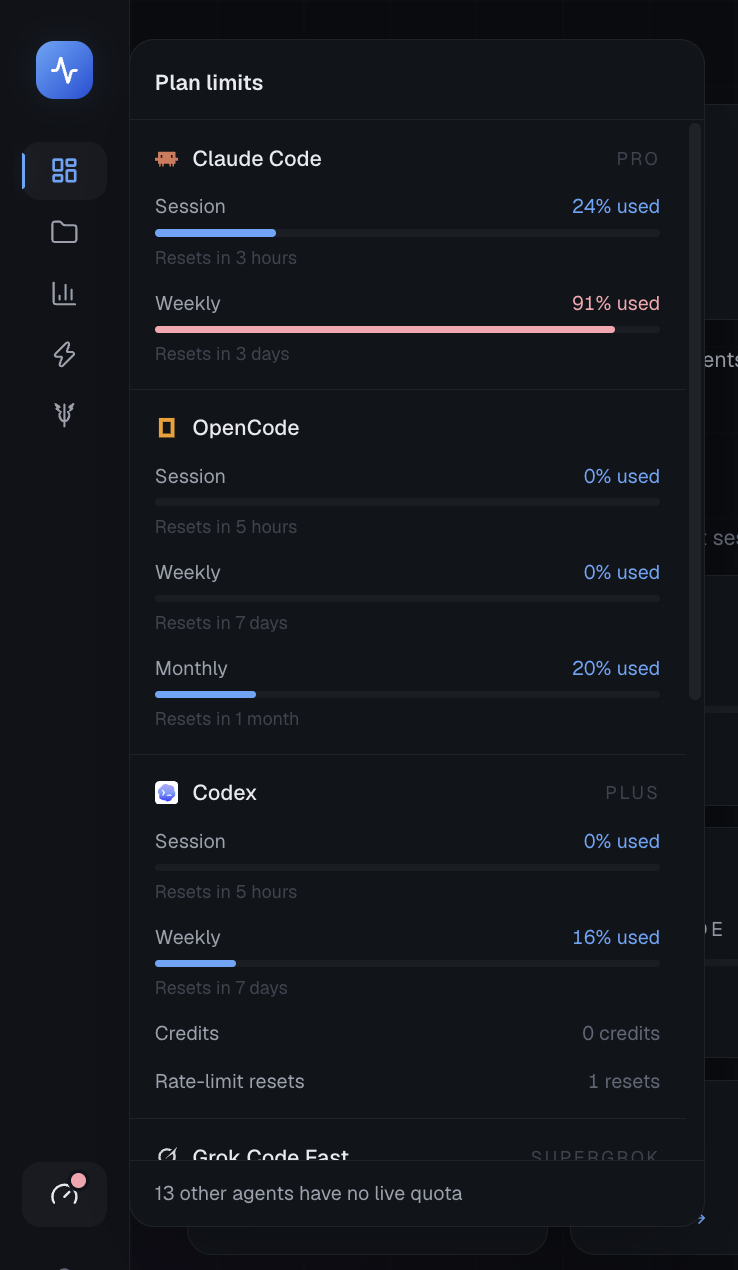
Each window fills as it is spent and carries its own reset time, so a nearly-spent weekly is visible next to a session that has barely started. Above, Claude Code's weekly sits at 91% and is red while its session is at 24%, and Codex reports credits and rate-limit resets as plain balances because neither has a ceiling to fill.
Each agent's own page (Agents → Claude Code, and so on) carries the same reading in its panel, and the dashboard's agent tiles show a slim meter for that agent's closest-to-full window.
Which agents report
| Agent | What it reports | Read from |
|---|---|---|
| Claude Code | 5-hour session, 7-day window, extra usage | macOS Keychain, or ~/.claude/.credentials.json |
| Codex | 5-hour session, weekly, credits, rate-limit resets | ~/.codex/auth.json |
| GitHub Copilot | Chat and completion allowances, premium credits | Editor apps.json, GitHub CLI, or OpenCode's Copilot login |
| OpenCode | Rolling session, weekly, monthly | ~/.local/share/opencode/auth.json |
| Grok Code Fast | Weekly credit pool | ~/.grok/auth.json |
| Cursor | Monthly usage, on-demand spend | Cursor's local state database |
| Gemini CLI | Per-model quota | ~/.gemini/oauth_creds.json |
Every other supported agent is still listed, with the reason it has no live number. TokenTelemetry never invents a quota: if a provider exposes no account API, the card says so rather than estimating one from your session history.
Reading the meters
A meter fills left to right as the window is spent and is labelled the way the provider labels it, so the dashboard and your provider's usage page can be compared without mentally inverting one of them.
| Used | Colour |
|---|---|
| Below 75% | Brand blue |
| 75% to 89% | Amber |
| 90% and above | Red |
A window with nothing left reads Limit reached rather than "100% used".
Balances without a ceiling — credits, extra usage, rate-limit resets — are shown as plain readings rather than bars, because a bar needs a maximum to fill and inventing one would be a guess.
When an agent has no number
Not every gap is a problem to fix, so the status says which kind it is.
| Status | Meaning | What to do |
|---|---|---|
| Not signed in | No local credentials found for that agent | Sign in with the agent itself |
| Sign in again | Credentials exist but the session has lapsed | The card names the command to run |
| No plan quota | The account is valid but has nothing to report, such as a retired free tier | Nothing; this is accurate |
| Needs refresh | The provider was asked and the request failed | Usually transient; hit Refresh |
| Quota unavailable | That agent has no account-quota API at all | Nothing |
Being signed out is a fact about the account rather than a fault, so it does not raise the amber "could not refresh" warning. That warning means a fetch actually broke.
Plan limits are not budgets
These two look similar and answer different questions.
| Plan limits | Budgets | |
|---|---|---|
| Set by | Your provider's plan | You |
| Measures | Provider-reported quota | TokenTelemetry's own cost accounting |
| Scope | Your whole account | One project, optionally one agent |
| Answers | "How much of my plan is left?" | "Am I overspending on this repo?" |
Use plan limits to see whether Claude Code is about to stop answering. Use budgets to see whether one project is eating your month.
Privacy
Credentials are read from disk immediately before a request to that provider and are never cached, logged, or included in any API response. Requests go to the provider you are already logged in to, using the login already on your machine. Nothing is sent to TokenTelemetry.
Readings are cached locally for five minutes at quotas.json in your data directory, so the dashboard is not re-asking every provider on each page load. Refresh forces a fresh fetch.
Read-only
Tips
- If Claude Code shows Not signed in on macOS, the first read needs Keychain permission. Approving it once with "Always Allow" is enough.
- A stale reading is labelled Cached on the agent's card. The gauge polls once a minute and the underlying cache refreshes every five.
- The weekly window is the one worth watching. Session windows refill within hours; a spent weekly can leave you waiting days.