Loops, goals & workflows
What your agents did while you weren't watching — recurring loops, goal-driven runs, and dynamic multi-agent workflows, with the tokens each one actually spent.
Most token telemetry assumes a person is sitting there typing. The expensive sessions usually aren't those. They're the ones that kept running after you walked away: a loop firing every hour, a goal that refused to let the agent stop, a workflow that fanned out into eighty subagents.
TokenTelemetry detects all three from the agents' own local logs and prices them separately, because each one costs money in a different way.
| What it is | Agents | Repeats? | |
|---|---|---|---|
| Loop | a prompt on a schedule | Claude Code, Grok Build, Cline | yes, until it expires or is cancelled |
| Goal | an objective the agent works toward across turns | Codex, Claude Code, Grok Build, Antigravity | no, it's one run |
| Workflow | one prompt that fans out into many subagents | Claude Code | no, but it can be huge |
All three are read from local agent storage. Nothing is uploaded, and nothing is fetched from the network to build these views.
Recurring loops
A loop is a session that scheduled itself to run again: Claude Code's /loop,
a cron, a self-pacing heartbeat, Grok Build's scheduler (Grok Tasks), or Cline's
Scheduled Agents.
Detected from the scheduling call, not the command
TokenTelemetry never looks for the /loop text. It looks for the scheduling
tool call the agent actually made:
- Claude Code —
CronCreate(a fixed cron),ScheduleWakeup(a self-paced heartbeat),CronDelete(stop). - Grok Build — its scheduler create / fire / delete signals.
- Cline — the Scheduled Agents table in its own database.
This matters because a loop started some other way still gets caught. A goal
that self-perpetuates through ScheduleWakeup leaves no /loop breadcrumb at
all, but it is still a loop and still costs money, so it still shows up.
Liveness is recomputed, never cached
A loop's state is one of:
| State | Meaning |
|---|---|
active | fired recently enough for its cadence, still scheduled |
expired | ran once and finished, hit a cron's 7-day ceiling, or went stale after the session ended |
cancelled | a delete call named this loop's own job |
unknown | scheduled but never observed firing |
Liveness is derived from wall-clock time on every request rather than stored. An idle loop writes nothing to disk, so a cached "active" would stay "active" forever and quietly lie to you. The raw facts (cadence, job id, fire count, creation time) are cached; the state is not.
Two details that follow from how the agents behave:
- Claude Code crons are in-memory and expire 7 days after creation. That ceiling is Claude-specific, so it's only applied to Claude loops.
- Cancellation must name the loop. A session that deleted some other scheduled job no longer marks this loop cancelled. Claude deletes count only when they carry the loop's own job id; Grok deletes count only when they happened after the loop's last firing.
Next run
Active loops show when they fire next. Cron loops compute the next real match of their expression, evaluated in your local timezone because that's the clock the agent's scheduler fires on. Heartbeat loops project one cadence past the last fire. A loop that's overdue but still inside its grace window reads due now rather than hiding the field.
What a loop costs
The token and cost figures for a loop are its own fire turns, not the whole session. A session that set up a loop usually did plenty of unrelated work too, and attributing all of that to the loop would badly overstate it. These tokens are an attribution view over numbers already counted in the session total, never an addition to them.
Where an agent only reports a whole-session total (Grok) or runs each fire as a separate session (Cline), the loop shows its cadence and fire count with cost marked not applicable rather than inventing a number.
Where to see loops
- Session trace — a Loop card with cadence, job id, fire count, state and next run.
- Analytics — a Recurring loops section across every project.
- Project → Config — an inventory of the loops set up in that repo.
- Project → Insights — active/expired/cancelled counts and the loops' own token and cost footprint.
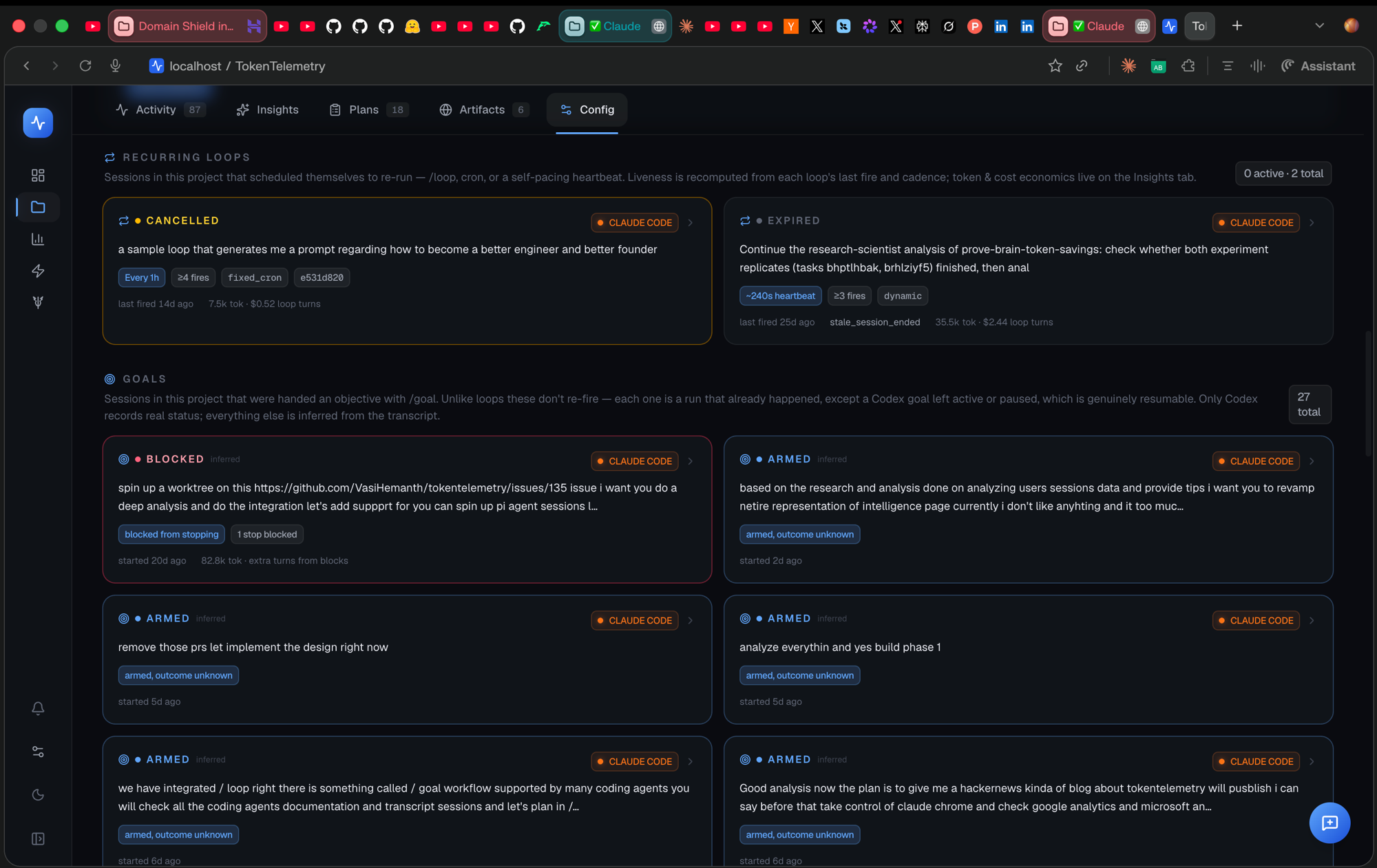
That's the Config tab: recurring loops at the top, goals below them on the same page. The loop cards carry the state, cadence, fire count and job id, and the "7.5k tok · $0.52 loop turns" figure is the loop's own fire turns rather than its session's total.
Goals
A goal hands the agent an objective and lets it keep working. Four agents ship a
/goal command and all four mean something different by it, which is the
single most important thing to know when reading these numbers.
| Agent | Mechanism | Can it tell you the outcome? |
|---|---|---|
| Codex | Goal Mode, with its own goal store | Yes — it records real status |
| Claude Code | a stop condition that blocks the agent from ending its turn | No |
| Grok Build | progress checkpoints reported as it works | Only if it reports completion |
| Antigravity | a marker meaning "run long without me" | No |
Reported vs inferred
Every goal card says where its status came from.
Codex counts a goal's tokens and wall-clock itself and writes down whether it is active, paused, complete or blocked. Those cards are marked reported: the numbers are Codex's, not ours.
Everything else is marked inferred, reconstructed from transcript
breadcrumbs. In particular, a Claude Code goal is never shown as finished.
Claude records no completion event of any kind: the transcript contains the
moment a goal was armed and each time it blocked the agent from stopping, and
nothing else. So a Claude goal reads armed, blocked, or outcome unknown.
It would be easy to show "complete" and it would be a guess, so the card says
unknown instead.
An inferred status is evidence, not a verdict. If a goal matters, check the session trace rather than trusting the chip.
Goal cost means three different things
There is deliberately no single "total goal cost" anywhere in the product, because the three bases are not comparable and adding them would produce a meaningless number:
- Codex — counted by the agent. Its tokens are already inside the session total you see above the card, so the card shows them as a share of that session, not as extra spend.
- Claude Code — extra turns. Only the turns that ran because a stop was blocked. This one genuinely is additional work the goal caused, and it adds up: a single project here shows 834,865 tokens spent purely on blocked-stop turns.
- Grok and Antigravity — the whole session. Neither records a per-goal boundary, so the session is the goal, and the card says so instead of fabricating a split.
Blocked stops and the cap
For Claude Code, the useful number is how many times the goal refused to let the agent stop. Those blocks are grouped into runs, and a run that reaches 8 consecutive blocks is flagged, because Claude Code ends the turn with a warning at that point rather than looping forever.
Where to see goals
- Session trace — one Goal card per goal. A session can set several, so this is a list, not a single card.
- Project → Config — every goal set in that project, ongoing and finished.
- Project → Insights — goals set, outcomes unknown, stops blocked, and the extra token cost, each kept in its own bucket.
Dynamic workflows
Claude Code's Workflow tool takes one prompt and fans it out across many subagents, often in phases: a batch of agents to explore, another to implement, another to verify. A single workflow run can be the most expensive thing in your whole history.
Why this needs its own detection
The Workflow tool writes each spawned agent one directory deeper than an ordinary subagent:
<session>/subagents/workflows/wf_<id>/agent-<agentId>.jsonl
<session>/subagents/workflows/wf_<id>/journal.jsonl
That extra level matters more than it sounds. Those files are never picked up as sessions, and the ordinary subagent scan only looks one directory shallower. Without a dedicated pass, a workflow's tokens would be counted nowhere at all — not in the parent session, not in delegation, not in analytics. Every number would silently undercount by the entire workflow.
On this machine, one session's workflows account for 86 subagents, 5.59M tokens and $65 that would otherwise have been invisible.
Phase labels
The journal.jsonl beside each run maps an agent id to a human label, so agents
show up as their phase ("review", "verify", an area name) rather than as opaque
ids. Agents whose output carries no usable label fall back to their id rather
than being dropped.
Where to see workflows
Workflow agents appear in the session trace's Delegated work card, tagged as
a dynamic workflow with their run id and phase. They're grouped under the
workflow-subagent type in the delegation breakdown, so you can see the
workflow's share of a session at a glance.
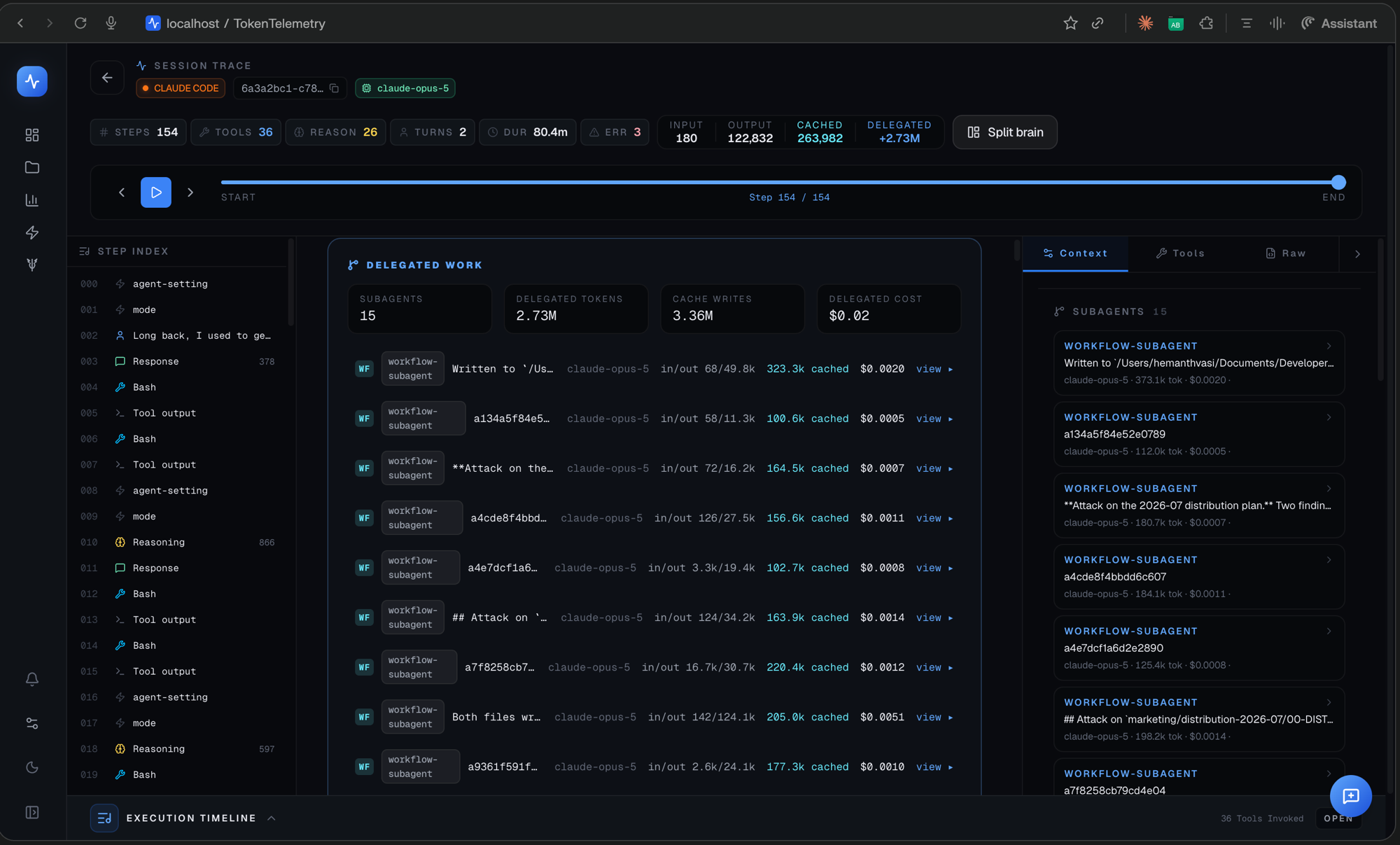
Worth reading the header numbers on that trace: the session's own output is 122,832 tokens, while delegated is 2.73M. Almost everything that session spent went to its workflow agents, and every one of those rows is a file that the ordinary subagent scan would have walked straight past.
Counted once. Workflow agents are files inside the parent session's directory, not sessions of their own, so their tokens are attributed to the parent and never double-counted as separate sessions.
Limits worth knowing
- Fire counts are a lower bound. A loop's iterations are counted from re-injected prompts observed in the transcript. If an agent pruned its own history, earlier fires are gone.
- Goal support is four agents, not all of them. The other supported agents have no goal feature to read. They simply don't show goal cards rather than showing empty ones.
- Workflows are Claude Code only, because the Workflow tool is.
- Nothing here is a control surface. TokenTelemetry reads what the agents recorded. It cannot start, stop, or cancel a loop, goal, or workflow; do that in the agent itself.